Key Takeaways
- North-South traffic crosses the data center boundary, while East-West traffic moves between internal workloads. Their paths determine where inspection is required.
- VLANs separate network segments, but security policies must control communication between them.
- Interface speed alone does not determine firewall capacity. Inspection throughput, routing and redundancy also affect performance.
- A suitable deployment matches physical connectivity and security inspection capacity to the traffic each network zone generates.
Introduction
A data center can have high-speed switches and redundant links yet still contain security gaps. Internal workloads may communicate too freely, some traffic may bypass inspection, or a firewall may become a bottleneck when several network zones share the same appliance. Deploying an NGFW firewall therefore requires a clear understanding of traffic paths, segmentation and routing.
Where Should a Firewall Be Deployed in a 100G Data Center?
The deployment point depends on which traffic needs inspection and whether that traffic can pass through the firewall without creating unnecessary network hops.
North-South and East-West Traffic Have Different Security Requirements
North-South traffic enters or leaves the data center. Typical examples include users accessing hosted applications, branch-office connections, internet traffic and communication with external cloud services. A firewall at the data center edge can inspect these connections before they reach internal application networks.
East-West traffic moves between internal workloads. For example, a web server may communicate with an application server, which then queries a database. These connections remain inside the data center, so perimeter protection alone may not inspect them.
The traffic path of a three-tier application illustrates the difference:
| Traffic flow | Example | Relevant security control |
| User to web tier | Internet user accessing a web server | Edge policy, IPS and application inspection |
| Web to application tier | Web server connecting to an application service | Inter-zone policy or microsegmentation |
| Application to database tier | Application server querying a database | Restrict source, destination and required ports |
| Server to external service | Workload connecting to an API or cloud service | Egress filtering and destination control |
Sending every internal connection through a single perimeter appliance can add unnecessary hops and concentrate traffic at one inspection point. For high-volume East-West traffic, fabric-level policies, host-based firewalls or dedicated internal inspection points may be more practical.
How Does Firewall Placement Affect the Network Path?
A firewall must sit on the actual path of the traffic it is expected to inspect. If a core switch routes traffic directly between two server VLANs, an edge firewall will not automatically see those packets.
One approach is to use the firewall as the gateway for selected security zones. Inter-zone traffic then passes through its policies. This is useful when connections require stateful inspection or application-level controls. However, directing all subnet-to-subnet traffic through a central appliance can create a bottleneck as East-West traffic grows.
Another approach is to keep routine traffic within the network fabric and steer selected flows through security services. This reduces unnecessary inspection load while retaining controls for sensitive application paths.
A well-designed Network firewall deployment should be based on a traffic-flow diagram. Mark the source and destination zones, gateway locations, routing points and inspection points. Then check whether both forward and return traffic pass through the intended firewall. Asymmetric routing can disrupt stateful inspection and cause sessions to fail.
How Can Network Segmentation Improve Data Center Security?
Once traffic paths are understood, segmentation determines which internal connections are permitted and which require inspection.
Separate Network Zones by Workload and Trust Level
A useful segmentation plan groups resources by function and security requirement rather than simply by physical rack or switch. Common zones include:
- DMZ: public-facing web servers, reverse proxies and services that accept external connections.
- Application zone: application servers that process business logic and communicate with approved services.
- Database zone: database servers that accept connections only from authorized application hosts.
- Management zone: administrative interfaces, monitoring platforms and infrastructure management services.
- Shared-services zone: backup servers, DNS, directory services and logging platforms.
For example, a database server may need to accept connections from an application server on a defined database port. It normally does not need unrestricted access from the public-facing web tier. A rule that permits only the required source, destination and service is more effective than allowing an entire subnet to connect.
VLANs provide Layer 2 separation, while subnets and routing determine how traffic moves between network segments. Neither automatically provides complete application security. Inter-zone policies must define which connections are allowed. Where applications share a subnet or move frequently between hosts, microsegmentation or host-level controls may also be necessary.
How Should Firewall Rules and IDS/IPS Work Together?
A firewall policy controls whether a connection is permitted. Intrusion detection and prevention inspect monitored traffic for suspicious patterns.
An IDS identifies potential threats and generates alerts. An IPS can block traffic that matches configured detection rules. These functions are related but not interchangeable. The phrase Intrusion Detection Firewall sometimes appears in searches, but buyers should check whether a specification refers to detection, inline prevention or both.
For each inter-zone rule, define the source, destination, application, protocol and port. Also decide whether the connection requires IPS or deeper application inspection, what logs must be retained, and who is responsible for reviewing alerts.
A default-deny approach is useful for sensitive zones: allow documented business connections and deny other traffic. For example, a database zone may permit TCP 1433 only from designated application servers if the deployment uses Microsoft SQL Server on its standard port. This is an example rather than a universal rule; the actual service and port depend on the application configuration.
What Changes in a Multi-Tenant Data Center?
A multi-tenant environment must keep different customers or business units logically separated. Separate VLANs may not be sufficient if routing, shared services or management access create paths between tenants.
Virtual routing domains, security zones and tenant-specific policies can provide additional separation. Shared services such as DNS, authentication and backup should have narrowly defined access from each tenant. Where tenants use overlapping IP address ranges, the routing and virtualization design must account for those overlaps.
A suitable Enterprise security firewall design should make tenant boundaries visible in both the routing plan and policy structure. It should also allow one tenant to be isolated without disrupting unrelated workloads.
What Should Buyers Check When Integrating a Firewall into Existing Network Infrastructure?
After defining security zones and traffic paths, interface compatibility, routing and availability determine whether the appliance can fit into the existing network.
Do the Interfaces Match the Switches and Optical Links?
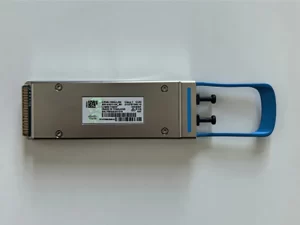
100G data center links commonly use QSFP28 interfaces, while 25G server or aggregation links often use SFP28. The connector type alone does not confirm compatibility. Buyers should check the supported transceiver, wavelength, fiber type, reach, cable type and switch-side requirements.
| Connection | Common interface | Details to verify |
| Core or spine uplink | 100GE QSFP28 | Optics, fiber reach, link mode and port speed |
| Leaf or aggregation link | 25GE SFP28 | Transceiver compatibility and switch configuration |
| Short in-rack connection | DAC or AOC | Supported cable length and device compatibility |
| Breakout connection | QSFP28 to multiple SFP28 lanes | Supported breakout mode and switch configuration |
Some platforms support breaking out a QSFP28 port into lower-speed lanes, but the available combinations depend on the appliance and software version. A transceiver supported by the switch is not necessarily supported by the firewall.
How Do Static Routes, OSPF and BGP Affect Integration?
The routing method should match the network’s scale and how frequently routes change.
Static routing works well in small, stable environments with a limited number of next hops. It is straightforward to manage, but route changes require manual updates.
OSPF is an interior gateway protocol suited to exchanging routes within an enterprise or data center routing domain. It can recalculate paths after topology changes, subject to network design and convergence settings.
BGP is commonly used where routing policy, multiple autonomous systems or large-scale route exchange are required. It offers policy controls but requires careful configuration of peers, route filters and path attributes.
Consider a firewall connected to two core switches. If both switches provide a default route, the design must define the preferred path and what happens when one uplink fails. Static routes may be sufficient in a simple topology. OSPF can be useful when multiple internal routes must be exchanged and recalculated. BGP may be more appropriate when the data center exchanges routes with separate networks or service providers.
Before deployment, check route ownership, failover behavior, route filtering and return-path consistency. A route change should not send one direction of a stateful session through a different path from the return traffic.
What Redundancy Should Be Tested Before Go-Live?
Redundancy must cover more than the appliance’s power supply. Review the full path, including firewall interfaces, upstream switches, downstream links, routing adjacencies and power feeds.
In an active-passive design, confirm that the standby unit receives the required configuration and session information. Test how long traffic takes to recover after failover. In an active-active design, verify how traffic is distributed and whether routing and session handling support the intended behavior.
Before production traffic is moved, test the loss of an uplink or switch connection, firewall failover, session recovery and routing convergence. Also confirm that forward and return traffic follow the intended inspection path and that logs remain visible during normal operation and failover.
A Hardware firewall should be assessed as part of the network path, not as an isolated appliance. High interface speed cannot compensate for incorrect routing, a single upstream failure point or a policy that blocks legitimate application traffic.
Why Choose the Fortinet FG-4201F for High-Density Data Center Integration?
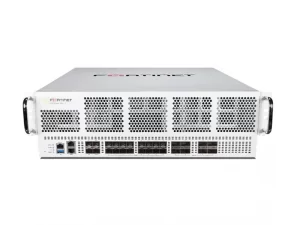
For environments that need high-speed uplinks and multiple lower-speed connections, the Fortinet FG-4201F combines 100GE and 25GE interface options with dedicated security-processing hardware. Its specifications are relevant to dense data center deployments, but buyers should compare its inspection performance with their expected traffic mix.
| Parameter | FG-4201F specification |
| Form factor | 3RU rack-mount appliance |
| 100G/40G interfaces | 8 × 100GE QSFP28 / 40GE QSFP+ slots |
| 25G/10G/1G data interfaces | 16 × SFP28/SFP+/SFP slots |
| Dedicated interface groups | 2 × HA and 2 × AUX SFP28/SFP+/SFP slots |
| Security processors | NP7 network processors and CP9 content processor |
| Local storage | 2 × 1.92TB storage devices |
| Power and cooling | Redundant hot-swappable power supplies and hot-swappable fan tray |
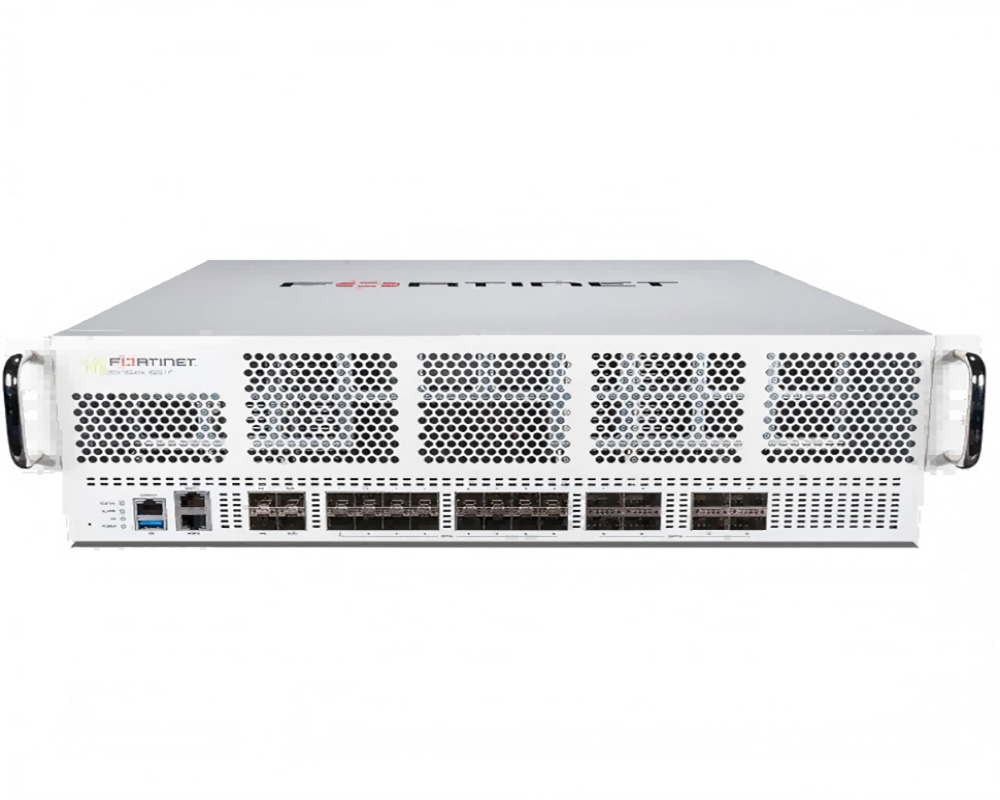
100G and 25G Interfaces Support Different Network Layers
The QSFP28 slots can connect to high-speed core or spine links, while the standard SFP28 data slots can connect to 25G or lower-speed network segments. This combination supports different link speeds at the firewall without requiring every connection to use the same interface type.
The HA and AUX SFP28 slots serve dedicated high-availability and auxiliary roles. They should not be counted as ordinary data interfaces. Supported breakout configurations and port-speed restrictions should be checked against the target software release and connected switch configuration.
NP7 and CP9 Handle Different Processing Tasks
The NP7 network processor accelerates supported network and session-processing functions. The CP9 content processor accelerates resource-intensive security tasks such as SSL inspection and pattern matching.
Forwarding large volumes of traffic and inspecting encrypted or threat-related content are different workloads. Hardware acceleration does not mean every traffic type or security feature receives identical performance. Buyers should compare the published NGFW, IPS and threat-protection figures with the security services they intend to enable.
The published series figures list up to 47 Gbps NGFW throughput, 52 Gbps IPS throughput and 45 Gbps threat-protection throughput. These are separate test categories, not additive capacities. If a deployment relies on IPS, the IPS figure is more relevant than the interface rate. If multiple security services are enabled together, buyers should look for performance data that reflects the intended feature combination and traffic profile. A 100G interface does not mean the appliance can inspect 100 Gbps of traffic with every security feature enabled.
Segmentation Features Support Physical and Virtual Workloads
The platform supports segmentation use cases, including VXLAN-related functions. This can be useful when physical servers, virtual workloads and different application zones share a data center fabric.
For example, selected traffic between application and database zones can be directed through firewall policies, while fabric-level controls handle routine local segmentation. This approach focuses advanced inspection on flows that need it, rather than sending every internal packet through a centralized inspection point.
Virtual domains can also help separate network and administrative contexts. The supported number of domains and available functions depend on the software version and licensing, so these should be checked against the planned configuration.
Redundant Hardware and Local Storage Support Operations
The appliance uses redundant, hot-swappable power supplies and a hot-swappable fan tray. These features can reduce the need to power down the entire unit for certain hardware replacements. Front-to-back airflow is also relevant where rack equipment must match the data center’s hot-aisle and cold-aisle cooling layout.
The FG-4201F includes two 1.92TB storage devices. Local storage can support appliance functions that use onboard storage, but it should not be treated as a replacement for an external logging, backup or retention architecture. Buyers should identify which services use local storage and how long records need to be retained.
Frequently Asked Questions
Does a 100G port mean the FG-4201F can inspect 100 Gbps of threat traffic?
No. Port speed and security inspection throughput measure different things. The published series figures list up to 47 Gbps NGFW, 52 Gbps IPS and 45 Gbps threat-protection throughput. Actual results depend on traffic composition, enabled features and test conditions.
How many standard data ports does the FG-4201F have?
It has eight 100GE/40GE QSFP28 slots and 16 standard 25GE/10GE/GE SFP28 data slots. It also has two HA and two AUX SFP28 slots, plus two GE RJ45 management ports. HA and AUX interfaces have dedicated roles and should not be counted as standard data ports.
Can the FG-4201F support multi-tenant network segmentation?
It supports segmentation-related functions, including virtual domains and VXLAN use cases. The actual tenant design depends on routing, policy structure, software version and licensing. Shared services and management access must also be separated appropriately.
Does every server-to-server connection need to pass through a firewall?
No. High-volume East-West traffic may be better controlled through fabric policies, host-based firewalls or microsegmentation. Centralized firewall inspection is useful for flows that require stateful inspection, application control or deeper threat analysis.
When should a data center use OSPF instead of static routes?
Static routes are suitable for small, stable routing environments. OSPF is useful when multiple internal routes need to be exchanged and recalculated after topology changes. The choice depends on network size, route ownership, convergence requirements and operational complexity.
Conclusion
A data center firewall must accommodate changes in traffic volume, application placement and network structure over time. High-density connectivity can provide room for additional links, while dedicated processing resources support different inspection workloads. Segmentation features can help maintain separation as physical and virtual workloads change, and replaceable hardware components can simplify certain maintenance tasks.
These capabilities are most valuable when the network team keeps application dependencies, routing changes and security policies up to date. Reviewing traffic logs, removing obsolete rules and checking new communication paths help prevent gradual policy expansion from weakening the original security design.
To discuss interface planning, security-zone design or deployment requirements, visit the Fortinet FG-4201F product page or contact CREA DAS TECH for product details and a configuration quotation.