Key Takeaways
- Match network speed to the amount of data your servers exchange, rather than relying on advertised speed alone.
- Check network protocols, PCIe slots, cables, and switch compatibility before choosing a model.
- Evaluate InfiniBand for AI training and high-performance computing when the network architecture supports it.
- Confirm the exact model, product condition, accessories, and installation requirements before ordering.
Introduction
Choosing the right network card means matching the adapter to the server, network equipment, and workload. A high-speed card cannot deliver its full potential if the switch, cable, or server interface limits the connection.
What Should You Consider When Choosing a Network Card?
Start by identifying how much data your servers need to transfer and which network equipment they already use. These factors determine the required bandwidth, connection type, and suitable network adapter options.
Match Network Speed to Your Workload
The right network speed depends on data volume, communication frequency, and application requirements. A file server or business application with moderate traffic may not benefit enough from a 400 Gb/s adapter to justify the additional network investment. In this case, compare 10, 25, or 100 Gb/s options against measured traffic and expected growth.
An AI server may exchange large amounts of data between computing nodes during model training. If network congestion repeatedly slows distributed training, a higher-bandwidth adapter may help. Check network utilization and data transfer rates before upgrading. If the network is not the bottleneck, replacing the card alone is unlikely to improve training performance.
Choose Ethernet or InfiniBand for Your Network
Ethernet is widely used in enterprise networks and data centers. Choose an Ethernet adapter when your existing servers, switches, cables, and network management tools use Ethernet and you want to expand the network without changing its architecture.
InfiniBand is designed for high-performance connections between computing and storage resources. The InfiniBand Trade Association describes the technology as a high-performance interconnect suited to demanding computing environments. For AI training clusters that frequently exchange data between multiple GPU nodes, InfiniBand is worth evaluating when the servers and switches support it. If your existing network uses Ethernet only, account for the additional compatible switches and connection components before selecting an InfiniBand adapter.
Check the Complete Data Path
A network adapter’s advertised speed does not guarantee the same speed for every application. Performance also depends on the switch, cable or transceiver, server interface, and connected equipment.
For example, a GPU server cannot achieve a 400 Gb/s end-to-end connection through a switch port limited to 100 Gb/s. In this case, either choose an adapter that matches the existing network or include a compatible switch and connection components in the upgrade budget. Check the speed supported by every component before paying for a higher-bandwidth card.
How to Check Network Card Compatibility with Your Server
After choosing the network type and target speed, verify that the adapter fits the server and meets its operating requirements. This step helps prevent installation problems and unexpected hardware costs.
Check the PCIe Interface and Physical Space
PCIe is the internal connection that allows a network adapter to communicate with a server. Compare the card’s PCIe generation, lane configuration, and dimensions with the server’s available expansion slot.
For a PCIe x16 card, confirm that the server supports the required interface and can provide sufficient power. A card that fits physically may not receive the expected bandwidth or operating support. If the server documentation does not confirm compatibility, ask the manufacturer or supplier to verify the configuration before ordering.
Match Ports, Cables, and Switches
Check the network port type, supported protocol, data rate, and required cables or optical modules. The switch must support the same network technology and a compatible connection speed.
For example, an OSFP port is not interchangeable with every other transceiver or cable format. An InfiniBand adapter also cannot be treated as a standard Ethernet card. Before ordering, confirm the exact port and cable combination with the equipment supplier, especially when connecting the adapter to an existing data center network.
Check Drivers, Power, and Cooling
The server’s operating system and platform must support the adapter’s drivers. For Linux servers, confirm support for the specific distribution and version. For virtualized environments, check the hypervisor and any required network features. These checks are especially important for production servers that cannot easily be taken offline.
High-speed adapters also require suitable power and airflow. NVIDIA’s ConnectX-7 documentation provides model-specific installation and operating requirements. If the server has limited internal space or restricted airflow, confirm that its cooling design can support the card before purchasing it. A compatible PCIe slot alone does not guarantee safe, reliable operation.
What Should Buyers Verify Before Ordering a Network Card?
Once technical compatibility is established, compare the product details and purchasing terms. A written checklist helps prevent confusion between similar models and makes supplier quotations easier to evaluate.
Confirm the Exact Model and Product Condition
Record the full model number and verify the network type, port configuration, data rate, PCIe interface, and form factor. Models within the same product family may have similar names but different connection types or capabilities.
For used or refurbished products, ask whether the card has been tested and whether the supplier provides a warranty. Confirm which accessories are included, such as brackets, cables, or additional connection components required for the intended configuration. If an accessory is necessary for installation, list it in the quotation request rather than assuming it is included.
Compare Warranty, Delivery, and Technical Support
When purchasing a Server network adapter, compare stock availability, estimated delivery time, warranty coverage, return terms, and technical support rather than evaluating products by unit price alone.
For projects with a fixed installation date, a product with confirmed compatibility and reliable delivery may be a better choice than a cheaper card with uncertain stock or missing accessories. Ask suppliers to state the model number, product condition, included items, and delivery terms in writing so that quotations can be compared on the same basis.
Why Choose NVIDIA ConnectX-7 MCX75510AAS-NEAT Network Card?
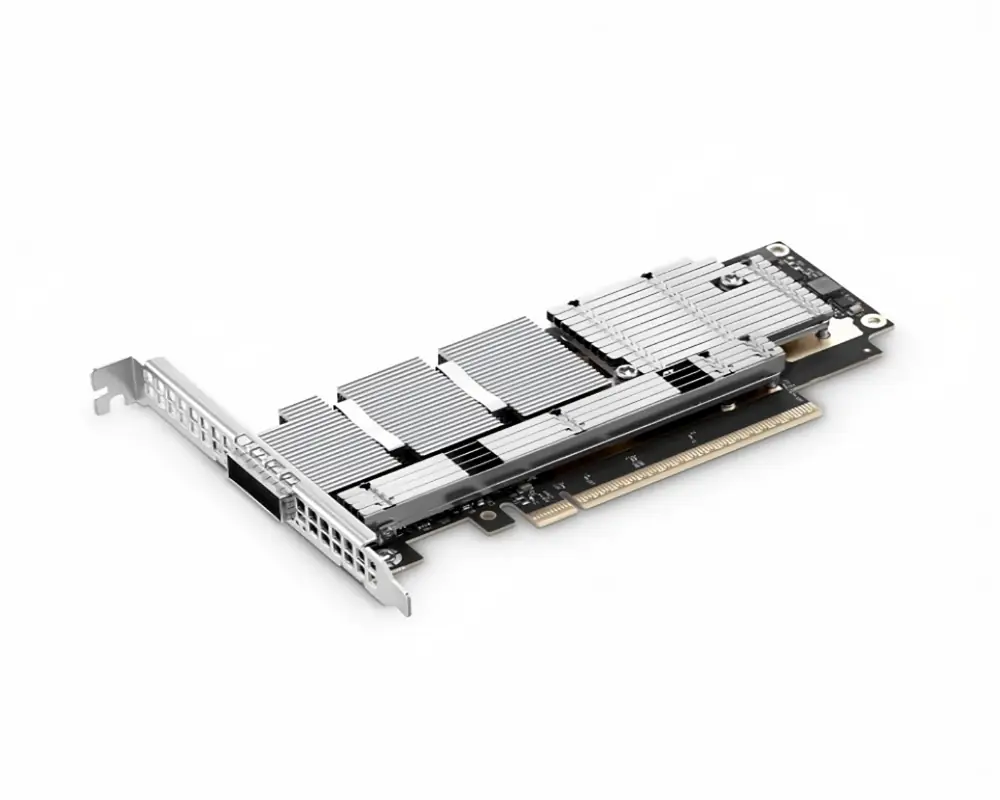
The NVIDIA ConnectX-7 MCX75510AAS-NEAT is a single-port OSFP NDR InfiniBand adapter for compatible high-performance server environments. It is worth evaluating for AI clusters and computing applications that need high-bandwidth connections between nodes. Before ordering, confirm the exact part number, product condition, and installation requirements with the supplier.
| Specification | Details |
| Model | MCX75510AAS-NEAT |
| Network port | Single OSFP port |
| Network type | NDR InfiniBand |
| Maximum data rate | Up to 400 Gb/s |
| Server interface | PCIe Gen 4.0/5.0, x16 lanes |
| Card form factor | PCIe half-height, half-length (HHHL) |
 High Bandwidth for Distributed AI Workloads
The adapter supports NDR InfiniBand at up to 400 Gb/s. This makes it a candidate for AI training clusters where multiple servers or GPU nodes exchange large amounts of data. It may also suit high-performance computing environments that need fast communication between computing nodes and storage resources.
The supported link rate does not guarantee the same application performance. Switch capacity, cabling, connected devices, and workload design all affect results. If a cluster experiences network congestion during distributed training, assess the full network path before deciding whether this adapter will address the bottleneck.
InfiniBand Connectivity for Compatible Clusters
This model uses NDR InfiniBand rather than standard Ethernet. The network must include compatible InfiniBand switches and connection components.
This distinction matters when expanding an existing data center. If the current infrastructure uses Ethernet, decide whether to retain that network or deploy a separate InfiniBand fabric for demanding workloads. Choose this model when the network architecture and connected equipment support InfiniBand; otherwise, evaluate an Ethernet adapter that matches the existing infrastructure.
PCIe Compatibility and Installation Requirements
For an AI GPU server cluster, confirm that the adapter’s PCIe interface, physical dimensions, power requirements, and operating-system support match the intended server platform.
The card uses a PCIe x16 interface and a half-height, half-length form factor. These specifications help determine whether it fits the server chassis and expansion slot, but a complete compatibility check is still necessary.
NVIDIA identifies the MCX75510AAS-NEAT as a Socket-Direct-ready card. Depending on the server configuration, additional connection components may be required. Before ordering, confirm whether the intended setup needs an auxiliary PCIe connection card or associated cables. Also verify the server’s power supply, airflow, and operating-system support against the manufacturer’s documentation.
Confirm the Configuration Before Purchase
For a new AI cluster, provide the server model, node count, switch model, required network protocol, and target bandwidth. For an upgrade, also provide the existing adapter model and describe where data transfer slows down. These details help determine whether the ConnectX-7 MCX75510AAS-NEAT fits the intended environment or whether another interface or speed would be more suitable.
Before confirming the order, request written confirmation of the exact model, product condition, included accessories, warranty, stock status, and delivery schedule. This reduces the risk of receiving a card that fits the server but cannot connect to the intended network.
Frequently Asked Questions
What Is the Maximum Speed of the ConnectX-7 MCX75510AAS-NEAT?
The model supports NDR InfiniBand at up to 400 Gb/s. The actual transfer rate depends on the network configuration, connected equipment, and workload.
Can the ConnectX-7 MCX75510AAS-NEAT Connect Directly to an Ethernet Switch?
This model is specified as a single-port OSFP InfiniBand adapter. Do not assume it can connect directly to a standard Ethernet-only switch. Confirm the network protocol and required switch and cable components before purchasing.
What Should I Check Before Buying This Adapter?
Confirm the exact model, server PCIe interface, physical clearance, InfiniBand support, power and cooling requirements, and any additional connection components. Also verify product condition, included accessories, warranty, and delivery terms with the supplier.
How Do I Choose the Right Network Card for My Server?
Identify the workload, target bandwidth, network protocol, and existing switch capabilities first. Then check the server interface, cables, drivers, power, and cooling. Choose an option that meets these requirements and provides enough capacity for planned growth, rather than paying for a speed the rest of the network cannot use.
What Is the Difference Between Ethernet and InfiniBand?
Ethernet is widely used for enterprise networks and general data center connectivity. InfiniBand is designed for high-performance interconnection and is commonly used in AI and high-performance computing clusters. Choose Ethernet when compatibility with the existing network is the priority. Consider InfiniBand when the workload benefits from high bandwidth and low latency and the infrastructure can support it.
Conclusion
As AI models and computing tasks become more demanding, communication between servers plays a greater role in overall performance. The NVIDIA ConnectX-7 MCX75510AAS-NEAT provides a high-speed interconnect option for compatible environments where multiple computing nodes need to exchange data efficiently. Its potential value lies in supporting demanding workloads such as distributed AI training and high-performance computing.
For businesses expanding their computing infrastructure, the priority is to match the adapter to the intended workload and network design. A suitable configuration can help avoid compatibility issues and support a more practical path for future cluster expansion.
If you are evaluating network adapters for AI servers, GPU servers, or high-performance computing projects, contact CreadaTech with your server configuration, application requirements, and expansion plans. We can help review compatible options and provide a quotation based on your project needs.