Key Takeaways
- Calculate storage requirements based on current data volume, annual growth, and planned service life.
- HDD is suitable for large-capacity storage, while SSD is better for frequently accessed data.
- RAID 1, RAID 5, RAID 6, and RAID 10 provide different balances between data protection and usable capacity.
- If you already have a Fibre Channel SAN, check Fibre Channel first. For Ethernet-based storage environments, iSCSI can be considered.
- If data continues to grow, check the available drive bays and expansion enclosure support in advance.
- RAID does not replace backup. Important business data still needs an independent backup strategy.
Introduction
Choosing a storage system starts with calculating capacity, then selecting the storage media, data protection, connectivity, and expansion space.
Businesses may need to store business files, databases, virtual machines, applications, and backup data. These data types have different capacity and access requirements, so the storage configuration also needs to match how the data is used.
How Much Storage Capacity Do You Actually Need?
Start by calculating future data requirements before deciding how much usable capacity the system should provide.
Looking only at the current data volume can easily lead to underestimating future requirements. For example, if a business currently has 40 TB of data and expects 20% annual growth, the estimated data volume after three years would be:
40 × 1.2³ = 69.12 TB
This means that if the business plans to use the system for three years, the current 40 TB data volume should not be treated as the final storage requirement.
The calculation should consider:
- Current data volume
- Expected annual growth
- Planned service life
- Usable capacity after RAID configuration
- Space reserved for future growth
How Do You Know If the Capacity Is Enough?
A three-year requirement of about 70 TB means that the current 40 TB capacity is not enough for the planned service life.
With 40 TB of current data and approximately 20% annual growth, the estimated data volume after three years is about 70 TB. The final storage configuration should also account for RAID overhead and additional space for future growth.
Should You Choose HDD, SSD, or a Mixed Configuration?
A hard disk is more suitable for large-capacity storage, while a solid state drive is better suited to frequently accessed data. A mixed configuration can cover workloads that need both capacity and speed.
When Should You Choose HDD?
Large data volumes with relatively low access requirements can be stored on HDD.
Typical uses include file archives, large volumes of business files, backup data, and other data that is accessed less frequently.
For these workloads, storage capacity usually matters more than access speed. HDD is therefore a practical choice for capacity-focused storage.
When Should You Choose SSD?
Frequent data reads and writes generally call for SSD storage.
The National Institute of Standards and Technology (NIST) defines a solid state drive as a storage device that uses solid-state memory to store persistent data.
In simple terms, SSD uses solid-state memory instead of traditional mechanical components to store data. This makes it suitable for workloads where fast data access matters. Common examples include databases, frequently accessed business applications, and systems that require fast data retrieval.
When Is a Mixed Configuration Suitable?
A mixed configuration works well when a business handles both frequently accessed data and large data volumes.
Frequently used business data can be placed on SSD, while large file collections and archive data can remain on HDD. Each storage medium can then handle the type of workload it suits best.
Which RAID Level Fits the Workload?
The main difference between RAID levels is the balance between data protection and usable storage capacity.
RAID combines multiple drives and uses part of the storage space for redundancy. According to the Storage Networking Industry Association (SNIA), this approach can help maintain data availability when certain drives fail.
Common RAID levels can be understood as follows:
| RAID | Main Feature | Suitable For |
| RAID 1 | Mirrors data with lower usable capacity | Data protection priority |
| RAID 5 | Balances capacity and protection | General business storage |
| RAID 6 | Can tolerate more drive failures | Large-capacity storage |
| RAID 10 | Combines mirroring and performance | Workloads requiring both performance and protection |
SNIA’s definition of RAID 6 notes that this configuration can protect data when up to two storage devices fail.
Which Storage Connectivity Should You Use?
The existing network infrastructure is a good starting point. Fibre Channel fits environments that already use a Fibre Channel SAN. iSCSI works with Ethernet-based storage networks, while SAS can be used for direct connections to compatible devices.
Fibre Channel
A data center with an existing Fibre Channel SAN can continue using the same storage connectivity.
Before purchasing, check the compatibility of the server HBA, Fibre Channel switch, and available ports.
iSCSI
iSCSI can use the existing Ethernet network between servers and storage.
This option suits businesses that already have the required Ethernet infrastructure. It can also reduce the need for a separate dedicated storage network.
SAS
SAS is an option for direct connections between storage and compatible equipment.
Check the server or connected device for SAS support before purchasing.
How Much Expansion Capacity Should You Leave?
Initial capacity is only part of the calculation. The system should also have enough room for future storage growth.
For example, 10 drives may meet today’s requirements, but a system limited to 12 drives would leave little room for expansion.
Before purchasing, check:
- Available drive bays
- Supported drive types
- Maximum number of drives
- Support for expansion enclosures
- Maximum expansion capacity
How Do You Know If There Is Enough Expansion Space?
The available drive bays should cover both current requirements and expected growth.
For example, a business currently using 12 drives may have more room to grow with a system that supports up to 24 drives and additional expansion. This allows storage to be added later as data volumes increase.
What Else Should You Consider Besides RAID?
RAID can protect against certain drive failures, but it is not a backup solution.
RAID alone cannot recover data lost through accidental deletion, file corruption, virus attacks, or other system problems.
Important business data should also have:
- Independent backup
- A data recovery method
- Controller redundancy
- Redundant storage connections
How Much Reliability Do You Need?
Business impact should guide the required level of protection.
A storage interruption can affect production, orders, or core operations. In such environments, controller redundancy and redundant connection paths should be considered alongside an independent backup strategy.
Temporary files with limited business value may not require the same level of protection.
Dell PowerVault ME5024 Provides Flexible Enterprise Storage Configurations
For businesses looking for a Storage server with 2U rack storage, HDD and SSD support, multiple host connectivity options, and future expansion, the Dell PowerVault ME5024 can be considered.
| Specification | ME5024 |
| Rack size | 2U |
| Drive bays | Up to 24 × 2.5-inch |
| Controllers | Single or dual controller |
| Storage media | HDD / SSD |
| Host connectivity | Fibre Channel, iSCSI, 12Gb SAS |
| Expansion | Supports additional ME5 expansion enclosures |
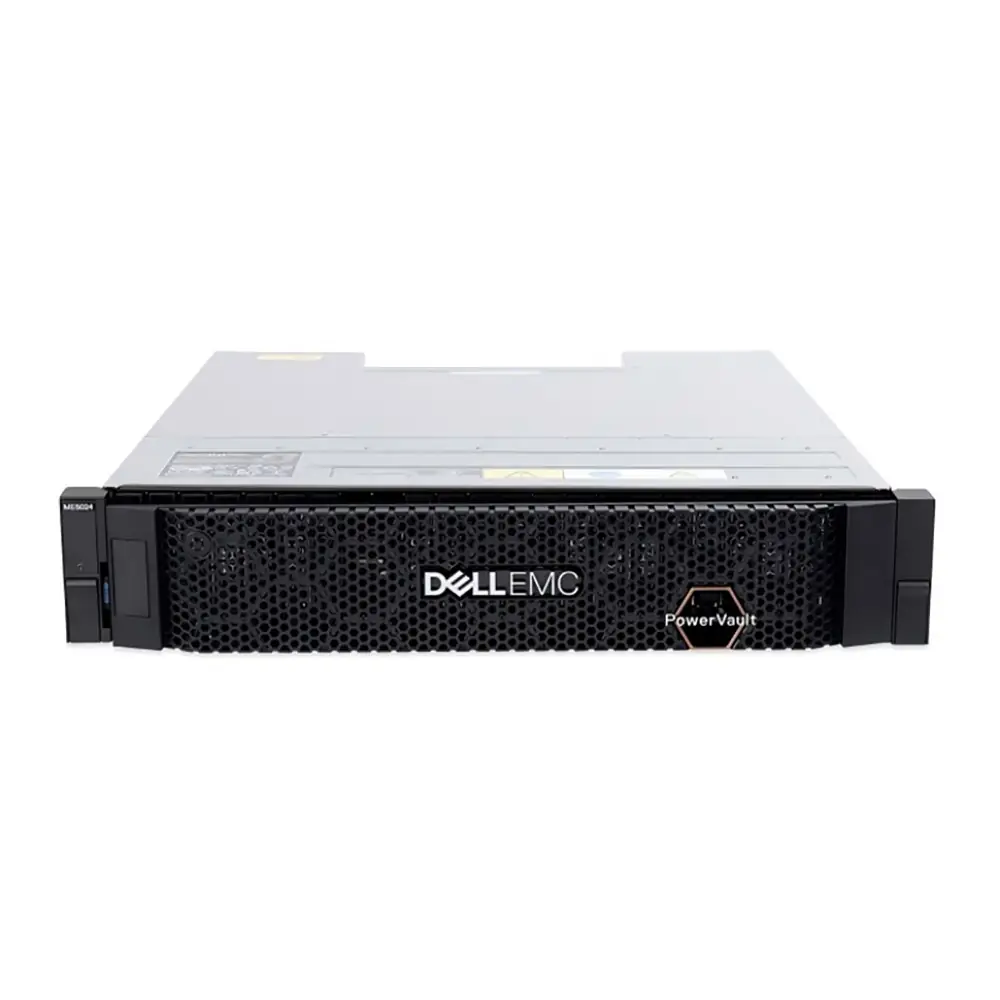
Compact 2U Rack Design
The ME5024 uses a 2U rack design and supports up to 24 2.5-inch drive bays.
For environments with limited rack space that still need multiple drive bays, this design provides more storage capacity within a compact rack footprint.
HDD and SSD Support for Different Workloads
The ME5024 supports both HDD and SSD, allowing the storage configuration to match different workload requirements.
Frequently accessed data can be assigned to SSD, while large-capacity file storage and archive data can use HDD.
Multiple Host Connectivity Options
The ME5024 supports Fibre Channel, iSCSI, and 12Gb SAS for different host connection environments.
This allows businesses to select the interface that matches their existing storage network or compatible host devices.
Support for Future Storage Expansion
The ME5024 supports additional ME5 expansion enclosures, allowing storage capacity to be increased when the initial capacity is no longer sufficient.
For businesses with growing data volumes, this means the initial configuration does not have to include all planned capacity. Storage can be expanded as requirements increase.
Frequently Asked Questions
What Should You Check Before Ordering a ME5024?
Before ordering, check the required drive type, storage capacity, RAID configuration, host interface, and future expansion plan. The selected configuration should also match the available server, HBA, switch, or other host-side connections.
Can the ME5024 Use Both HDD and SSD?
Yes. The ME5024 supports both HDD and SSD configurations. This allows businesses to use different storage media for different types of data instead of using the same drive type for every workload.
Is a Single or Dual Controller Better for the ME5024?
The ME5024 is available with either a single controller or dual controllers. The choice can be considered alongside the required level of controller redundancy and the way storage services are deployed in the existing environment.
What Host Interfaces Does the ME5024 Support?
The ME5024 supports Fibre Channel, iSCSI, and 12Gb SAS host connectivity. Before purchasing, check that the selected interface matches the available server, HBA, switch, or other host-side connections.
Can the ME5024 Be Expanded After Initial Deployment?
Yes. The ME5024 supports additional ME5 expansion enclosures. This allows storage capacity to be increased later instead of requiring all planned capacity to be installed at the beginning.
Conclusion
A suitable storage configuration should solve both current storage requirements and future growth challenges. Capacity planning helps avoid running out of space, while the right combination of HDD, SSD, RAID, connectivity, and expansion support helps the storage environment match different workloads.
The Dell PowerVault ME5024 brings these requirements together in a 2U storage platform. It supports up to 24 2.5-inch drives, HDD and SSD configurations, Fibre Channel, iSCSI, and 12Gb SAS connectivity, as well as additional ME5 expansion enclosures. This makes it possible to start with a suitable initial configuration and add storage as requirements increase.
If you are planning a new storage environment, contact CreadaTech with your current data volume, data types, RAID requirements, server interfaces, and expected growth. We can help confirm suitable configurations, technical specifications, and quotation options.