Key Takeaways
- Compare firewall performance under the security functions you plan to use, not just the highest advertised throughput.
- Check interface types, VPN capacity, network layout, and room for future growth before choosing a model.
- Review hardware, security subscriptions, warranty, technical support, and delivery terms as part of the total purchase cost.
- Match the device to your actual traffic and security needs instead of paying for capacity you may not use.
Introduction
Choosing a Fortinet firewall involves more than comparing prices and headline performance figures. Buyers also need to understand how security features affect throughput, whether the available ports fit their network, and which licenses and support services are included in the quotation.
What Should Buyers Consider Before Comparing Firewall Options?
The right firewall depends on the traffic passing through it, the security functions that need to run at the same time, and the way devices connect across the network. A model with a high headline throughput may not be the best choice if its interface layout or security performance does not match the intended deployment.
How Much Traffic Does Your Network Handle?
Start by estimating how much data the firewall must process during normal and peak periods. Consider internet usage, file transfers, cloud applications, remote access, and traffic between internal network segments.
Throughput measures how much data a device can process over a given period. However, the result depends on the test conditions and the functions enabled. Basic firewall processing is generally less demanding than inspecting traffic for intrusions, controlling applications, and detecting malware.
For this reason, an NGFW firewall should be assessed using the performance figures that reflect the security features you intend to enable. A device that meets your needs with basic filtering may have less available capacity when several inspection functions run together.
Estimate peak demand rather than relying only on average usage. Also consider whether the business expects more employees, cloud services, connected devices, or remote users over the next few years.
Which Network Connections Do You Need?
Before comparing models, map the devices and network segments that the Network firewall must connect.
- WAN connects the business network to an internet service or another external network.
- LAN connects internal devices such as computers, printers, and servers.
- DMZ is a separate network segment often used for services that must be accessible from outside, such as public-facing servers.
- VLAN separates devices into logical network groups, even when they share physical switching equipment.
Count the required physical ports and check their types and intended roles. A port labelled for a particular function may have configuration restrictions, so do not assume that every port can be used interchangeably.
Also consider whether the firewall must connect to managed switches, wireless access points, a second internet connection, or equipment at another site. Confirm these requirements before selecting a model.
How Should Buyers Compare Performance and Deployment Requirements?
Once the traffic level and connection layout are clear, compare the performance figures and features that matter to the planned installation. Different figures describe different workloads, so they should not be treated as interchangeable.
Which Security Performance Figures Should You Check?
Product data sheets commonly list several throughput ratings:
- Firewall throughput measures basic traffic handling under the vendor’s stated test conditions.
- IPS throughput measures performance when intrusion prevention inspects traffic for suspicious activity.
- NGFW throughput measures performance with a specified combination of security functions, which may include firewalling, intrusion prevention, and application control.
- Threat protection throughput usually represents a broader set of inspections and may include malware protection.
The exact test methods and included features vary by manufacturer. Check the definitions in the data sheet before comparing figures across models or brands.
For example, a device may have a high basic firewall rating but a much lower threat protection rating. This does not automatically mean the device is unsuitable. It means buyers need to compare the figure that best reflects their intended security configuration.
What Should You Know About VPN and SD-WAN?
A virtual private network (VPN) creates an encrypted connection between users, networks, or locations. For site-to-site connections, check both the number of supported tunnels and the throughput available when encryption is enabled. A published tunnel count does not tell you how much data all those connections can carry at once.
Software-defined wide area networking (SD-WAN) can help manage traffic across multiple network connections according to configured policies. An SD-WAN router may be part of this setup, but buyers should verify which SD-WAN functions are built into the proposed device and which require additional licensing or other equipment.
If the business uses multiple internet links, remote branches, or cloud applications, check how the proposed configuration handles link failure, traffic priorities, and central management. These capabilities may depend on the model, software version, license, and network design.
Security configuration matters as much as feature availability. The U.S. Cybersecurity and Infrastructure Security Agency (CISA) recommends reducing unnecessary exposure and strengthening the security of remote-access and VPN infrastructure. Buyers can use its communications infrastructure hardening guidance as a reference when reviewing deployment and maintenance practices.
How Can Buyers Compare Supplier Terms and Total Cost?
The lowest hardware price does not always represent the lowest total cost. A quotation may cover the appliance alone, while security subscriptions, technical support, replacement services, or other requirements are priced separately.
What Should a Supplier Quotation Include?
Ask the supplier to identify the exact model, hardware configuration, included accessories, license scope, subscription period, warranty, and support arrangements. Confirm whether the quoted price includes the security features your business plans to use.
For a Business firewall, licensing details are especially important when advanced inspection, centralized management, or other services are required. Check the start and end dates of subscriptions, renewal costs, and whether the quoted license is new, renewed, or transferred.
Why Consider the FortiGate 40F?
The FortiGate 40F is one example of how to assess a firewall against a defined deployment. Its published specifications provide several performance figures and a clear interface layout. Whether it is the right choice depends on the expected traffic, security functions, and connections required at the site.
Key FortiGate 40F Specifications
| Specification | Published figure |
| IPv4 firewall throughput | Up to 5 Gbps |
| IPS throughput | 1 Gbps |
| NGFW throughput | 800 Mbps |
| Threat protection throughput | 600 Mbps |
| IPsec VPN throughput | Up to 4.4 Gbps |
| Physical interfaces | 1 GE RJ45 WAN/DMZ, 3 GE RJ45 internal ports, 1 GE RJ45 FortiLink port |
| Design | Desktop, fanless |
| Published noise level | 0 dBA |
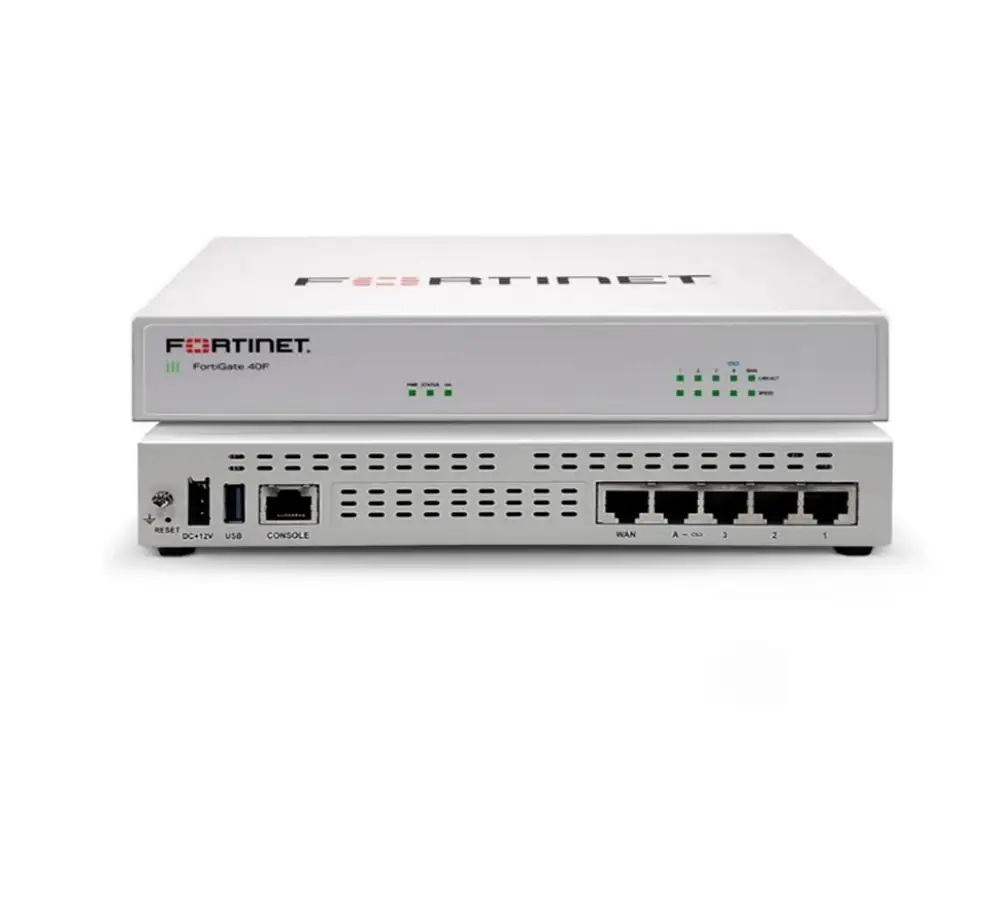
A Fanless Design for Quieter Workspaces
The 40F uses a fanless desktop design and has a published noise level of 0 dBA. This may be useful in offices or other locations where equipment noise matters.
A fanless design alone does not determine whether the firewall is suitable for a site. Buyers should also check the manufacturer’s installation guidance, ventilation requirements, operating environment, and expected workload.
Different Throughput Ratings for Different Security Tasks
The published ratings show up to 5 Gbps for IPv4 firewall throughput and 600 Mbps for threat protection throughput. These figures describe different workloads, so the gap should not be treated as a direct measure of product quality.
For a fair comparison, estimate the traffic that will pass through the device while the required security features are enabled. If the network depends on malware inspection and other advanced protections, the threat protection rating may be more relevant than the basic firewall figure.
Ports for Internet and Internal Network Connections
The listed interfaces include one GE RJ45 WAN/DMZ port, three GE RJ45 internal ports, and one GE RJ45 FortiLink port. This layout gives buyers a concrete starting point for checking physical connections.
Before ordering, map each required connection to a port and confirm the intended configuration. Consider whether the installation needs separate connections for the internet, internal switching, a DMZ, or managed FortiLink equipment. Additional switches or other network devices may be necessary depending on the site layout.
IPsec VPN Capacity for Connected Locations
Fortinet publishes IPsec VPN throughput of up to 4.4 Gbps and support for up to 200 gateway-to-gateway IPsec VPN tunnels. These figures may be relevant to businesses connecting multiple sites, but they describe different aspects of capacity.
Throughput indicates data-handling performance under the stated conditions, while the tunnel count indicates how many site-to-site VPN connections the device supports. Neither figure alone guarantees a particular speed across every connection. Buyers should check the planned number of sites, expected encrypted traffic, and security configuration.
When Might Another Configuration Be Better?
The FortiGate 40F may be worth considering when its port layout and performance ratings match the planned network. Another model or configuration may be more suitable when the site requires more physical interfaces, higher inspected throughput, different connectivity options, or greater capacity for future expansion.
The decision should be based on the required security configuration and expected traffic, not on the highest number in the specification table. Confirm the exact model, license package, and support terms before placing an order.
Frequently Asked Questions
What is the FortiGate 40F threat protection throughput?
Fortinet lists threat protection throughput of 600 Mbps for the FortiGate 40F. This is a published test rating, and actual performance can vary with configuration, traffic, and enabled security functions.
How many gateway-to-gateway IPsec VPN tunnels does it support?
Fortinet’s data sheet lists support for up to 200 gateway-to-gateway IPsec VPN tunnels. Buyers should still assess expected traffic and encryption requirements, as tunnel count and throughput measure different things.
Is the FortiGate 40F suitable for every small office?
No. Suitability depends on the number of users and devices, traffic levels, security functions, port requirements, and future growth. A small office with demanding inspection or connectivity needs may require a different configuration.
Why is basic firewall throughput not enough for comparison?
Basic firewall throughput does not represent every security workload. IPS, application control, and malware inspection can affect performance, so buyers should compare the rating that best matches the features they intend to enable.
What should buyers check before ordering a firewall?
Confirm the exact model, interfaces, security licenses, subscription period, warranty, technical support, delivery schedule, and total cost. Make sure the written quotation matches the configuration and services the business needs.
Conclusion
A firewall purchase affects more than network security. It also influences how easily the business can connect new sites, maintain consistent policies, and manage equipment over time. The FortiGate 40F’s fanless design, defined interface layout, and published VPN and security performance figures give buyers useful points to assess, but the final choice should reflect the network’s real workload and future plans.
CREADAS TECH can help buyers review enterprise IT hardware options and confirm product and supply details. Before requesting a quotation, prepare the expected traffic level, required security functions, port layout, number of connected sites, and license and support needs. This makes it easier to compare configurations and request a quote that matches the intended deployment.